Turning appointments into editable service orders
A checkout experience for Wix Bookings that lets service businesses adjust what actually happened during an appointment before charging the customer.
Wix · Wix Bookings · Senior Product Designer · 2025–2026

Overview
Product context
Wix Bookings helps service businesses manage their day through a calendar.
Owners and staff use it to schedule appointments, manage clients, assign services, and keep track of upcoming work.
In beauty and wellness businesses, the calendar is often where checkout starts as well. A client comes in for a booked appointment, but the final visit may include more than what was originally scheduled. They might add another treatment, buy a product, receive a discount, leave a tip, or change the service they booked.
Before this project, Wix Bookings could charge for the appointment price, but the appointment itself was not enough to represent the final sale. Owners needed a way to adjust the order before collecting payment.
Users and operating modes
Checkout did not happen in one fixed scenario. Solo owners often charged clients right after the appointment, while the client was still there. Front desk teams closed orders across multiple staff members, services, and products. Business owners relied on the same checkout action for reporting, revenue tracking, and sometimes staff commissions.
This meant the flow had to support both speed and accuracy. A simple appointment should be easy to close, but a changed order still needed to stay complete, valid, and accurate.
My Role
I led the product design for Owner Checkout, working closely with product, engineering, and payments from discovery through implementation.
A big part of my role was helping the team move away from thinking about this as a payment feature. The real need was to let owners build and adjust the order first, then charge for it.
I defined the checkout structure, the entry point from the calendar, the main editing interactions, and the order states that needed to stay in sync across booking changes, line items, totals, and payment eligibility.
Before Owner Checkout

Before Owner Checkout, collecting payment in Wix Bookings was tied to the original appointment.
That worked when the appointment and the final visit matched. But in many beauty and wellness businesses, the sale changed by checkout. Clients added treatments, bought products, received discounts, changed services, or left tips.
Owners had to bridge that gap themselves. They either adjusted things manually, marked appointments as paid with incomplete information, or completed the transaction outside Wix. This created inaccurate records for the business and moved many transactions outside Wix.

Sizing the Opportunity
The data showed that this was not a small edge case.
Beauty and Wellness was one of the largest areas of activity in Wix Bookings. Owners were managing the appointment workflow in Wix, but the final transaction often happened somewhere else.
38%
of Wix Bookings business value came from Beauty and Wellness
A major service vertical
One of the largest service verticals in the product.
86%
of transactions happened outside the Wix platform
A transaction gap
The appointment workflow was managed in Wix, but the final sale was not.
The appointment workflow was managed in Wix, but the final sale was not.
Wix was part of the workflow, but not the final transaction.
If businesses were already managing appointments in Wix, why were they completing the final sale somewhere else?
Understanding the Problem

The data showed where the gap was. Research helped explain why it was happening.
What owners told us
Across 15+ conversations with Beauty and Wellness business owners, the same pattern kept coming up: the original appointment did not always reflect what the client actually ended up buying.

What the market showed
I ran a broad benchmark across Wix Bookings competitors and POS tools to understand how similar businesses handled order changes before payment.
Existing Wix Bookings flow
Appointment → Collect payment
The final amount was treated as already defined by the original appointment.
Common category pattern
Appointment → Build or edit order → Collect payment
This reframed checkout from a payment action attached to an appointment into the workflow for building the actual order before payment.
Defining the Design Challenge
The next challenge was turning the reframe into a checkout workflow that could support real order changes without breaking pricing, validation, or payment logic.
Design question
How might we help owners turn what happened during a service into a complete order ready for payment?
Success criteria
The primary measure of success was whether owners would complete real customer orders through Wix, not just enter the checkout flow.
01
Increase checkout adoption inside Wix
Move more final sales into Wix instead of external tools.
02
Support real order completion through the flow
Use checkout for day-to-day customer orders, not just feature trials.
03
Enable payment completion through Wix
Complete payment after the final order is built.
04
Support successful checkout completion
Help owners who enter checkout complete payment successfully.
05
Keep order changes reliable
Maintain totals, validation, and payment states as the order changes.
Designing the Checkout Workflow
Once the system direction was defined, I focused on the UX decisions that would make checkout work in the owner’s real workflow.
The challenge was to keep checkout connected to the appointment, flexible enough for real service changes, and fast enough to use while working with a customer.
01
Keep checkout in context
I explored several interaction models, including a modal, a full-screen flow, and a side panel.
User conversations made it clear that owners did not see checkout as a separate task. They were already working from the calendar, so checkout needed to feel like a continuation of that workflow.
The tradeoff was focus versus continuity. A modal or full-screen flow could give checkout more focus, but it would also interrupt the calendar workflow owners were already using.
I chose a side panel model that kept checkout anchored to the appointment context while giving the order enough room to be edited before payment.

02
Support booking and order edits in one place
Most benchmarked products supported order-level edits, such as price changes, discounts, tips, or added items.
But in service businesses, the final sale can also change because the booking itself changes. Depending on how the owner defined the service, checkout might need to expose booking-related options such as staff member, service variant, duration, add-ons, or dynamic pricing.
I designed checkout to support both booking-related edits and order-level edits in the same flow. The system provided defaults from the original appointment, but allowed owners to adjust the relevant options before payment.
The tradeoff was simplicity of implementation versus accuracy of the owner workflow. Keeping booking and order edits together added system complexity, but it better matched how service businesses built the final sale.

03
Make editing fast enough for the service moment
Checkout often happens while the owner is still interacting with the customer, so editing had to feel fast and low-friction.
The data showed that price was one of the most common line-item edits, so I kept price editing directly available in the checkout view.
For other changes, the experience depended on the service setup. Adding an item created a line item with smart defaults, while deeper or service-specific changes opened only when needed.
The tradeoff was speed versus control. I kept common edits close to the line item and moved deeper settings into focused drill-down views, so owners could move quickly without losing access to advanced changes.


Defining the System Direction
I created a Dream Flow to define the full experience: from appointment, to editable order, to payment, all within the calendar context.
The goal was no longer just to design a checkout screen. It was to define how booking, order building, and payment should work as one connected workflow.
This gave product and engineering a shared model for the end-to-end experience before breaking it into implementation phases.

A turning point
When we reviewed the initial approach with engineering, the feedback was immediate: layering Checkout onto the existing Bookings flows would require roughly six months of work.
At first, this sounded like an implementation constraint. But it exposed a deeper issue in the concept itself.
We were treating Checkout as a feature layer, when the product needed a dedicated flow from appointment, to editable order, to payment.
Design shift from
layering a checkout feature onto existing flows
to
designing a dedicated order flow connected to the appointment
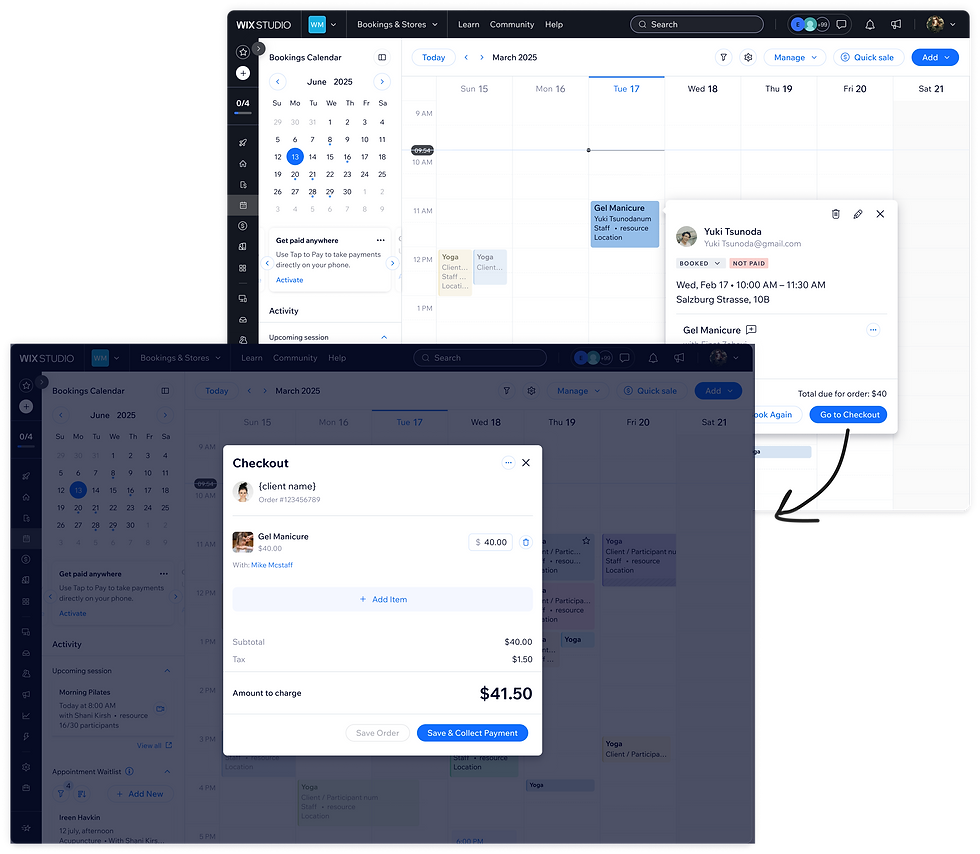
Initial product approach
The first approach was to introduce Owner Checkout as a feature layered onto the existing Wix Bookings flows.
Concept
Layer Checkout on top of the existing booking flow
How it would work
Instead of sending owners from the appointment directly to Collect Payment, the new entry point would open a checkout step where they could review and adjust order details before payment.
Rationale
This approach kept owners close to the calendar, reused familiar booking patterns, and allowed us to test the value of checkout without redesigning the underlying flow too early.
System Complexity
Owner Checkout was not just a new payment screen. It had to support different item types, pricing models, discounts, tips, fees, pricing plans, and payment methods.
From the owner’s perspective, checkout needed to feel like simple editing. From the system’s perspective, every edit could change totals, validation, payment eligibility, and the next valid action.
Changing the order amount
Could invalidate the current payment state or disable payment when the amount reached $0.
Adding or removing an item
Could change the order total, discount calculation, and payment eligibility.
Changing a booking-related option
Could affect staff availability, service variants, dynamic pricing, duration, or pricing plan behavior.
Selecting a payment method
Could depend on the owner’s payment setup, available payment options, premium status, and whether the order was eligible for online payment.
The tradeoff was simplicity versus system accuracy: the UI had to feel flexible and lightweight, while every edit still needed to preserve valid totals, payment states, and next actions.

Mapping the line item logic
My role was to map how each line item could behave across item type, service setup, price type, booking state, pricing plan, and payment eligibility.
I created mapping tables, flow diagrams, edge case documentation, and component variants to align product and engineering on the main checkout states, validation rules, fallback flows, and disabled states.
This mapping shaped key interaction decisions: edits would open in focused drill-down views instead of interrupting checkout with separate modals, price editing would remain directly accessible because data showed it was one of the most common owner edits, and the order had to be saved or committed before moving into payment.
The goal was to keep the interface simple and flexible, while making sure the system could handle the complexity behind the scenes.

The final flow
The final flow shows how the side panel, editable order, and payment step worked together inside the calendar context.
Watch for: calendar entry point, editable line items, drill-down edits, and payment completion.

What happened next
While engineering was implementing the first checkout phase, I expanded the same system direction into the next phase:
redesigning Owner Booking flows for additional business models, including courses and pricing plans.
This phase was less about inventing new functionality and more about redesigning existing flows and states so they worked consistently with the new checkout model.
I used Cursor to build a working version of the redesigned flows, including the key states and edge cases, and shared it with engineering as a PR.
This helped reduce ambiguity around interaction logic, state behavior, and implementation details before the team moved forward.
Working version of the redesigned Owner Booking states and edge cases:

Summary & Impact
Owner Checkout closed a critical gap in Wix Bookings by allowing service businesses to build the final order, adjust it before payment, and complete checkout without leaving the booking workflow.
In the first month after launch, the strongest signal was order completion: owners were not just entering checkout, they were using it to create and complete real customer orders through Wix.
Success criteria revisited
01
Increase checkout adoption inside Wix
Move more final sales into Wix instead of external tools.
4.6K+
owners used Owner Checkout
Owners completed the checkout flow and collected payment through Wix.
02
Support real order completion through the flow
Use checkout for day-to-day customer orders, not just feature trials.
48K+
48K+ orders created through the flow
Orders were created, edited, and saved through Owner Checkout in the first month after launch.
03
Enable payment completion through Wix
Complete payment after the final order is built.
$1.2M+
$1.2M+ in online payments processed through checkout
Payment volume that previously happened outside Wix could now be processed through the checkout flow.
04
Support successful checkout completion
Help owners who enter checkout complete payment successfully.
62%
of checkout sessions resulted in successful payment
In the first month, the majority of checkout sessions ended with payment completed through Wix.
05
Keep order changes reliable
Maintain totals, validation, and payment states as the order changes.
Supported dynamic
order changes in
real use
Session reviews showed owners actively editing checkout details before payment, including services, products, discounts, tips, totals, validation, and payment states.
Reflections
The main design challenge was turning a complex order system into an editing experience that still felt simple inside the owner’s daily workflow.
This project taught me that in complex workflows, simplicity does not come from hiding complexity. It comes from structuring the system so owners can make real changes without needing to understand the logic behind them.
It also changed how I approach engineering constraints. The turning point in this project came from treating a technical constraint as a product signal, and using it to redefine the flow before implementation.